Pulling product data off Alibaba by hand is tedious. You scroll, copy a title, paste it into a sheet, copy the price, paste that, open the next tab, and start again. Forty products in, you've lost your place and can't tell whether row 19 is a duplicate.
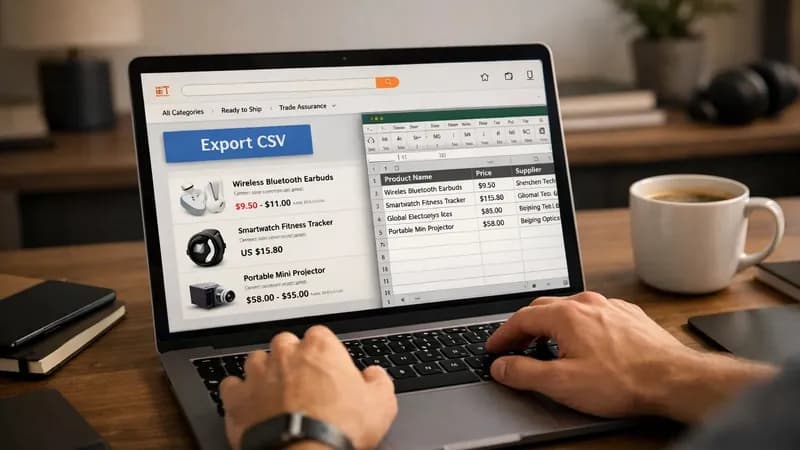
I built a small Alibaba scraper to remove that job. You run your search as usual, click one button, and the browser hands you a CSV file. If you need to scrape Alibaba regularly for supplier research, this is the fastest route from search results to a spreadsheet.
No re-typing. No duplicate rows. No tab management.
What the Alibaba scraper does on a search page
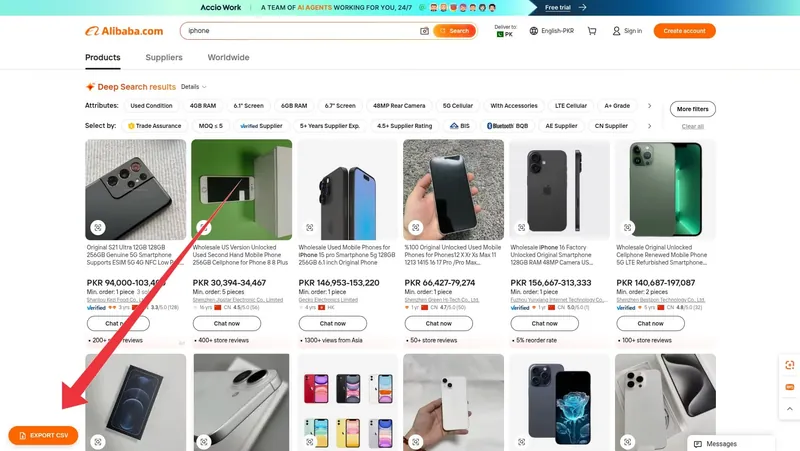
Once installed, the script adds an "Export CSV" button to Alibaba search result pages. It sits alongside Alibaba's own controls instead of floating over them. A button that looks bolted on is a button people distrust.
Click it, and the script reads every product loaded on the page and writes each one out as a row.
The six fields it pulls
Each product becomes one row with six columns:
- Product title
- Price
- Minimum order quantity
- Seller name
- Ratings
- Product link
I chose these product details because they answer the questions you actually ask when comparing suppliers:
- What is it?
- What does it cost?
- How many must I buy?
- Who am I buying from?
- Are they any good?
- Where do I go to ask?
What the file looks like when you open it
CSV stands for comma separated values. It's a plain text table with one line per product and fields separated by commas. It's about as close to a universal data format as you'll find, and its structure is defined in RFC 4180, the CSV specification.
Excel, Google Sheets, Numbers, and every database import tool I've used will open it without conversion.
If a field is missing on the page, it shows up as an empty cell instead of stopping the export. A supplier with no ratings yet still gets a row.
Installing the Tampermonkey userscript
This is a userscript: a small piece of JavaScript your browser runs on a specific website after the page loads.
A few things it isn't:
- It isn't a program you install on your computer.
- It isn't a repository you clone and
cd alibaba scraperinto before running terminal commands. - It doesn't change anything on Alibaba's side. It only changes what your own browser shows you.
Userscripts need a manager extension to run. I build mine for Tampermonkey, the userscript manager for Chrome and Firefox.
Three steps
- Install Tampermonkey from its official site.
- Open the script file. Tampermonkey recognises it and shows an install prompt listing the sites the script can run on.
- Go to an Alibaba search page. The Export CSV button appears in the results area.
It keeps working as you browse
Alibaba's search behaves like a single-page application. It swaps in new results without fully reloading the page. Scripts that only run once at page load quietly stop working when you paginate or change a filter.
This one watches for those in-page changes, so the button stays put as you move between Alibaba pages.
Where the scraped data goes next
Exporting is the boring half. The useful half is what the file feeds.
The CSV drops straight into whatever comes next:
- A larger scraping pipeline that enriches each supplier
- A merge with data you already hold, matched on product link
- A supplier outreach list, with seller names already attached
- An internal dashboard your team reads instead of the raw sheet
- A pricing or trend model you rebuild each week
Some of these need a better home than a folder of CSVs. Moving your scraped data into SQLite, PostgreSQL, Google Sheets, or Airtable turns it from a file you have to remember to open into a table you can query. It's the step most people skip.
The step after that is running the whole thing on a schedule instead of by hand. Both are part of the automation services I offer.
What this Alibaba scraper does not do
It reads what's on the page. That explains most of its limits:
- Only the current view. It captures the products loaded on screen. For deeper result sets, paginate and export again, or use a different build.
- No logins or region gates. Anything behind those is out of reach for a page-reading script.
- No high-volume requests. Alibaba runs anti scraping measures like most large marketplaces. A button you click yourself is gentle. A loop hammering the same endpoint is exactly the traffic those defences block.
- Occasional maintenance. When Alibaba changes its markup, a selector breaks and the script needs a small fix. Every scraper pointed at someone else's site carries that cost. I'd rather say so now than let you find out in month three.
Terms of service and robots.txt are your call
I can tell you how a scraper works. I can't tell you whether you're permitted to scrape Alibaba, or any other site, for your use. That depends on:
- The site's terms of service
- The robots.txt standard and how the site applies it
- Your jurisdiction
- What you do with the data afterward
Read them and decide before you run anything at volume. I build the technical piece; the compliance judgement stays with you.
Getting a version built for your own site
This Alibaba scraper targets one site. But the same pattern (a button on the page, structured rows out) works on most sites that show a list of things.
Most people respond to repetitive work by trying to do it faster. The alternative is removing the work entirely. That's what I do. Every build starts with a conversation about what the output should look like, before a line of code exists.
Want to see other builds first? There are more scraping write-ups on the blog, plus a short note on how I work as a one-person shop. When you know what you need, tell me about the site and the fields you want.