If you run a Payhip store, you already know that regular blog posts help with search rankings and give you something to link back to your product pages. The trouble is that writing one post is fine, but publishing ten or twenty posts in a week, each with a title, body text, and a header image, turns into hours of copying, pasting, and clicking "Publish." This article walks through how I set up payhip blog automation that reads post details straight from a Google Sheet and publishes them one after another, unattended, using the Automa browser extension.
What This Automa Chrome Extension Does for Your Payhip Blog
It turns a spreadsheet of blog ideas into live Payhip blog posts without you touching the keyboard after you press start. Automa is a free Chrome extension built for browser automation, and Automa's own site lists the full set of building blocks it can use: it can open tabs, fill in forms, and click buttons the same way a person would, just faster and without getting tired after post number twelve.
For this workflow, the steps run in this order for every row in your sheet:
- Read the next row that hasn't been posted yet
- Open the Payhip blog editor in a new tab
- Fill in the title and body text from that row
- Add the header image if the row has one
- Submit the post the same way you would by clicking the button yourself
- Write the finished post's web address back into the sheet, so you have a record of it
- Mark that row as done, so it never gets posted twice
None of this needs you to write a script or touch any code. You fill in a spreadsheet, and the extension does the clicking. It's one example of the kind of browser automation work I build for small businesses, where the goal is always to remove a repetitive manual task rather than hand you more software to learn.
Setting Up the Google Sheet That Feeds Your Posts
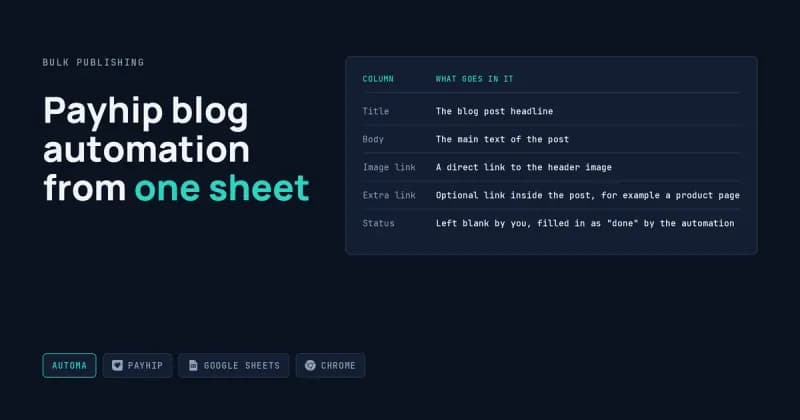
The sheet needs a handful of plain columns, and none of them require technical knowledge, just text and links. Here's the layout I use:
Column | What Goes In It |
|---|---|
Title | The blog post headline |
Body | The main text of the post |
Image link | A direct link to the header image |
Extra link | Optional link inside the post, for example a product page |
Status | Left blank by you, filled in as "done" by the automation |
You leave the Status column empty when you add a new row. Once the workflow runs, it fills that column in automatically, which is how it knows to skip rows it already handled. That means you can add new post ideas to the bottom of the sheet at any time, from your phone if you want, and the next run will pick them up without touching anything you already published.
What Happens Behind the Scenes When a Post Goes Live
The short version is that the extension opens Payhip's own blog editor and works through the same fields and the same submit button a person would use by hand. There's no separate app talking to Payhip in some hidden way. It's the real editor, filled in automatically, one row at a time.
Everything in between, opening the tab, typing the title, dropping in the body text, attaching the image, clicking submit, checking that it actually went through, happens in the background while you do something else. If the post publishes, the workflow grabs its web address and saves it to your sheet. If something stops it, that gets recorded too, so you're not left guessing which posts made it and which didn't.
Why This Is Good for Bulk Posting and Backlinks
This setup earns its keep once you stop thinking one post at a time and start thinking in batches. Payhip gives every store a blog for free, and every post it publishes is a normal page with its own address, which means every post can carry a link back to your product page, your main site, or anywhere else you choose. Doing that by hand for fifty posts is what stops most people; a loop that runs the sheet from top to bottom is what makes it realistic for one person to manage.
That's what makes this particularly useful for bulk posting aimed at free backlinking: you plan a batch of posts around topics related to what you sell, put them in the sheet with a link back to the relevant product each time, and let the automation publish the batch while you work on something else. It won't write good content for you, so the posts still need real thought, but it removes the part where typing and clicking eats your afternoon. I cover a few other angles on this kind of setup over in my other posts on automation projects, if you want more background before committing to one approach.
I put together a short video showing this exact setup running end to end, from the sheet to the finished Payhip blog post appearing live on YouTube, if you want to see it in motion before reading further.
When Something Goes Wrong
Automations built around a live website will eventually hit a snag, and it's worth knowing what those look like before you run a big batch.
- Blank or malformed cells: if the Title or Body cell is empty, the workflow either skips the row or submits an incomplete post, so it pays to scan the sheet before a run.
- Duplicate titles: publishing the same title twice can confuse the "already posted" check, so keep titles unique even if the body text is similar.
- Broken image links: if the image link is dead, the post still goes out, just without the picture, which is easy to miss until you look at the published page.
- Logged-out sessions: the automation works inside your actual logged-in browser tab, so if Payhip logs you out mid-run, the loop stops until you log back in.
- Posting too fast: firing off dozens of posts back-to-back in a short window can look unusual to any platform, so I space runs out rather than blasting the whole sheet at once.
- Sheet permission issues: if the Google Sheet's sharing settings don't include the right account, the workflow can't read the rows at all, and the run fails at the very first step.
Frequently Asked Questions
Do I need to know how to code to use this?
No. The setup lives entirely in a spreadsheet and a browser extension. You fill in columns with your title, body text, and image link, and the automation handles opening the Payhip editor and clicking through the form for you, the same way it would if you sat down and did it by hand.
Can this add images to the post automatically?
Yes, as long as the row in your sheet includes a working link to the image you want to use. The workflow drops it into the post header the same way you would by uploading it manually, so there's nothing extra to set up beyond pasting that link into the right column.
How many posts can it publish in one run?
As many rows as you put in the sheet, though I recommend spacing large batches out instead of running fifty posts back-to-back in one sitting. Publishing that fast in a short window can draw unwanted attention from the platform, so a bit of pacing between posts is worth building into the run.
Will this work for blogs other than Payhip?
This particular workflow is built around Payhip's blog editor specifically, since it matches that editor's exact fields and buttons. That said, the same idea, reading rows from a sheet and filling in a web form, works for other blogging tools too, it just needs a separate Automa setup built around that platform's own editor.
Does the sheet update itself, or do I have to check manually?
It updates itself. Every row gets marked once its post is live, and the finished post's web address gets written back into that same row, so you end up with a running log of every published post without ever opening the Payhip dashboard to check on it.
I'm a one-person automation shop that specializes in browser tools like Automa, and I build Automa workflows for store owners who need their Payhip blog stocked with posts without spending afternoons on copy and paste. If you want a version of this set up around your own sheet, your own product links, and your own posting schedule, describe what you're trying to publish through my hire-me request form and I'll put it together.