You have a column of domains — 40, 200, maybe 2,000 — and you need to know how old each one is. So you open a whois site, paste the first domain, wait for it to load, copy the creation date, paste it back into your sheet, and start again. An hour later you are on row 34 and your eyes hurt. A bulk domain age checker moves that lookup inside the spreadsheet itself: one column of domains, one formula, every result filled in for you. This post covers what such a checker returns, how the connection actually works, and the four ways it fails.
What a bulk domain age checker gives you back
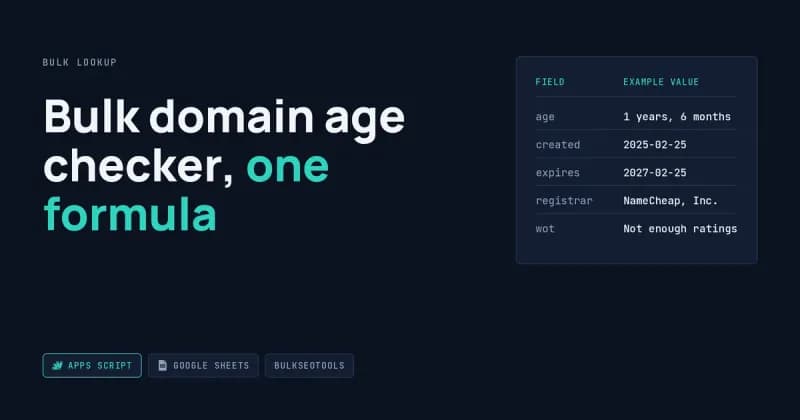
A bulk domain age checker returns the registration facts for every domain in one pass, instead of one page load at a time. For each row you get five fields back.
Field | Example value | What it tells you |
age | 1 years, 6 months | How long since first registration |
created | 2025-02-25 | First registration date |
expires | 2027-02-25 | When the current term ends |
registrar | NameCheap, Inc. | Who the domain is registered through |
wot | Not enough ratings | Community reputation rating, often empty |
Two of those need a warning. The age arrives as text — the phrasing is the service's, not mine — so it sorts alphabetically unless you convert it. And the reputation field is blank for most domains, because very few sites have enough ratings to show one.
If you would rather watch this happen than read about it, I recorded a 20-second version:
Why a Google Sheets formula cannot do this alone
Sheets already has fetching formulas — IMPORTDATA, IMPORTXML, IMPORTHTML — and none of them work here. They can only ask for a page by its address. Domain lookup services want you to submit a domain the way a form does.
The plain-English difference: asking for a page by its address is a GET, submitting a form is a POST. Sheets speaks GET only. So the formula you want does not exist out of the box, and every add-on selling it is doing the same thing underneath — adding a small piece of code that can speak POST.
That piece of code is a custom function written in Google Apps Script, which ships free with every Google account. It sits in your sheet, not on a server, and you own it outright — which is how I hand over every build.
How the API integration works, in plain terms
The API integration is a short script that takes the domain from a cell, sends it to the lookup service, and hands the answer back to the cell as five columns. Once it is saved, it behaves like any built-in formula.
=DOMAINAGE(A2:A, TRUE)
That one formula reads your whole domain column and spills age, created, expires, registrar and reputation across the sheet. The TRUE adds a header row so you are not guessing which column is which.
Three details make it usable rather than merely working. The script strips https:// and www. so pasted URLs behave the same as bare domains. It caches each answer for six hours, so a domain checked this morning does not get looked up twice. And it pauses briefly between rows rather than firing 200 requests in a burst, which is what gets a lookup service to stop answering you.
For anything past about fifty domains I skip the formula and use a menu button instead. It writes plain values into the sheet rather than live formulas, which means the results stop changing and stop re-fetching. That pattern — a scheduled script that fills a sheet and then leaves it alone — is most of what I do under API integration and scheduled pipelines.
- Open the sheet that has your domains in column A.
- In the top menu, go to Extensions → Apps Script. A new tab opens with a code editor and a few lines of placeholder text in it.
- Select everything in that editor and delete it, then paste the script below.
- Press the save icon, or Ctrl+S. Name the project whatever you like — the name has no effect on anything.
- Close the editor tab and reload your spreadsheet. This step matters. The new formula does not exist until the sheet reloads.
/**
 * Bulk domain lookups for Google Sheets (bulkseotools.com, no API key).
 *
 * Formulas:
 *   =DOMAINAGE(A2:A, TRUE)    -> age, created, expires, registrar, wot          (5 cols)
 *   =DOMAINDROP(A2:A, TRUE)   -> registrar, status, changed, created, expires,
 *                                redemption, pending_delete, drop_date, wot     (9 cols)
 *   =DOMAINAGEONLY(A2)        -> "1 years, 6 months"
 *   =DROPDATE(A2)             -> "2027-05-20"
 *
 * Menu ("Domain Tools") writes static values instead — better for long lists.
 */

var AGE_URL  = 'https://www.bulkseotools.com/json/bulk-check-domain-age.php';
var DROP_URL = 'https://www.bulkseotools.com/json/bulk-domain-drop-date-checker.php';

// field key in the JSON  ->  header shown in the sheet
var AGE_FIELDS = [
  ['age', 'age'],
  ['created', 'created'],
  ['expires', 'expires'],
  ['registrar', 'registrar'],
  ['wot', 'wot']
];

var DROP_FIELDS = [
  ['registrar', 'registrar'],
  ['status', 'status'],
  ['changed', 'changed'],
  ['created', 'created'],
  ['expires', 'expires'],
  ['rp', 'redemption'],
  ['pd', 'pending_delete'],
  ['dd', 'drop_date'],
  ['wot', 'wot']
];

// Where the menu writes results. 2 = column B, 7 = column G.
var AGE_START_COL  = 2;
var DROP_START_COL = 7;

/* ------------------------------------------------------------------ */
/* Core fetch                                                          */
/* ------------------------------------------------------------------ */

function fetchApi_(apiUrl, domain, cachePrefix) {
  var cache = CacheService.getScriptCache();
  var key = cachePrefix + '_' + domain.toLowerCase();
  var hit = cache.get(key);
  if (hit) return JSON.parse(hit);

  var page = apiUrl.indexOf('drop') > -1
    ? 'https://www.bulkseotools.com/bulk-domain-drop-date-checker.php'
    : 'https://www.bulkseotools.com/bulk-check-domain-age.php';

  var res = UrlFetchApp.fetch(apiUrl, {
    method: 'post',
    contentType: 'application/x-www-form-urlencoded; charset=UTF-8',
    payload: { query: domain },
    headers: {
      'accept': 'application/json, text/javascript, */*; q=0.01',
      'origin': 'https://www.bulkseotools.com',
      'referer': page,
      'x-requested-with': 'XMLHttpRequest'
    },
    muteHttpExceptions: true,
    followRedirects: true
  });

  if (res.getResponseCode() !== 200) return { error: 'HTTP ' + res.getResponseCode() };

  var data;
  try {
    data = JSON.parse(res.getContentText());
  } catch (e) {
    return { error: 'Bad JSON' };
  }
  if (Object.prototype.toString.call(data) === '[object Array]') data = data[0] || {};

  cache.put(key, JSON.stringify(data), 21600); // 6 hours
  return data;
}

function trim_(v) {
  return v == null ? '' : String(v).trim();
}

function toRow_(data, fields) {
  if (data.error) {
    var row = [data.error];
    for (var i = 1; i < fields.length; i++) row.push('');
    return row;
  }
  return fields.map(function (f) { return trim_(data[f[0]]); });
}

function blankRow_(fields) {
  return fields.map(function () { return ''; });
}

function headerRow_(fields) {
  return fields.map(function (f) { return f[1]; });
}

function cleanDomain_(v) {
  return String(v || '')
    .trim()
    .replace(/^https?:\/\//i, '')
    .replace(/^www\./i, '')
    .replace(/\/.*$/, '');
}

function build_(input, header, apiUrl, prefix, fields) {
  var list = Array.isArray(input) ? input : [[input]];
  var rows = [];
  if (header) rows.push(headerRow_(fields));

  for (var i = 0; i < list.length; i++) {
    var d = cleanDomain_(Array.isArray(list[i]) ? list[i][0] : list[i]);
    rows.push(d ? toRow_(fetchApi_(apiUrl, d, prefix), fields) : blankRow_(fields));
  }
  return rows;
}

/* ------------------------------------------------------------------ */
/* Custom formulas                                                     */
/* ------------------------------------------------------------------ */

/**
 * Age, created, expires, registrar and WOT rating.
 *
 * @param {A2:A100} input A domain or a range of domains.
 * @param {boolean} header Optional. TRUE to include a header row.
 * @return Five columns of WHOIS-based info.
 * @customfunction
 */
function DOMAINAGE(input, header) {
  return build_(input, header, AGE_URL, 'age', AGE_FIELDS);
}

/**
 * Registrar, status, changed, created, expires, redemption, pending delete,
 * drop date and WOT rating.
 *
 * @param {A2:A100} input A domain or a range of domains.
 * @param {boolean} header Optional. TRUE to include a header row.
 * @return Nine columns of expiry/drop info.
 * @customfunction
 */
function DOMAINDROP(input, header) {
  return build_(input, header, DROP_URL, 'drop', DROP_FIELDS);
}

/**
 * Just the age string, e.g. "1 years, 6 months".
 *
 * @param {A2} domain A single domain.
 * @return {string} The domain age.
 * @customfunction
 */
function DOMAINAGEONLY(domain) {
  var d = cleanDomain_(domain);
  return d ? trim_(fetchApi_(AGE_URL, d, 'age').age) : '';
}

/**
 * Just the estimated drop date, e.g. "2027-05-20".
 *
 * @param {A2} domain A single domain.
 * @return {string} The drop date.
 * @customfunction
 */
function DROPDATE(domain) {
  var d = cleanDomain_(domain);
  return d ? trim_(fetchApi_(DROP_URL, d, 'drop').dd) : '';
}

/**
 * Any single field from the drop-date response.
 * Valid keys: registrar, status, changed, created, expires, rp, pd, dd, wot
 *
 * @param {A2} domain A single domain.
 * @param {"dd"} field The JSON field to return.
 * @return {string} The requested field.
 * @customfunction
 */
function DOMAINFIELD(domain, field) {
  var d = cleanDomain_(domain);
  return d ? trim_(fetchApi_(DROP_URL, d, 'drop')[field]) : '';
}

/* ------------------------------------------------------------------ */
/* Batch runner (menu)                                                 */
/* ------------------------------------------------------------------ */

function onOpen() {
  SpreadsheetApp.getUi()
    .createMenu('Domain Tools')
    .addItem('Fill domain age', 'fillDomainAge')
    .addItem('Fill drop dates', 'fillDropDates')
    .addSeparator()
    .addItem('Clear results', 'clearResults')
    .addToUi();
}

function fillDomainAge() {
  fillColumns_(AGE_URL, 'age', AGE_FIELDS, AGE_START_COL);
}

function fillDropDates() {
  fillColumns_(DROP_URL, 'drop', DROP_FIELDS, DROP_START_COL);
}

function fillColumns_(apiUrl, prefix, fields, startCol) {
  var sheet = SpreadsheetApp.getActiveSheet();
  var last = sheet.getLastRow();
  if (last < 2) return;

  var n = last - 1;
  var width = fields.length;
  var domains = sheet.getRange(2, 1, n, 1).getValues();
  var existing = sheet.getRange(2, startCol, n, width).getValues();

  sheet.getRange(1, startCol, 1, width).setValues([headerRow_(fields)]);

  var start = new Date().getTime();
  var done = 0;

  for (var i = 0; i < n; i++) {
    // Bail out before the 6-minute limit; re-run to resume.
    if (new Date().getTime() - start > 5 * 60 * 1000) {
      SpreadsheetApp.getActive().toast(
        'Stopped at row ' + (i + 2) + '. Run again to continue.');
      break;
    }

    var d = cleanDomain_(domains[i][0]);
    if (!d) continue;
    if (existing[i][0] !== '' && String(existing[i][0]).indexOf('HTTP ') !== 0) continue;

    sheet.getRange(i + 2, startCol, 1, width)
         .setValues([toRow_(fetchApi_(apiUrl, d, prefix), fields)]);
    done++;

    if (done % 10 === 0) SpreadsheetApp.flush();
    Utilities.sleep(400);
  }

  SpreadsheetApp.getActive().toast('Filled ' + done + ' row(s).');
}

function clearResults() {
  var sheet = SpreadsheetApp.getActiveSheet();
  var last = sheet.getLastRow();
  if (last < 2) return;
  var lastCol = Math.max(AGE_START_COL + AGE_FIELDS.length,
                         DROP_START_COL + DROP_FIELDS.length) - 1;
  sheet.getRange(2, AGE_START_COL, last - 1, lastCol - AGE_START_COL + 1).clearContent();
}
Adding expiry, redemption and drop dates
A second endpoint on the same service answers a different question: when the domain becomes available to buy. That matters if you pick up expiring domains, or if you are tracking whether a competitor is about to let one lapse.
Field | Example | Meaning |
expires | 2027-02-25 | Registration term ends |
rp | 2027-04-11 | Redemption period — owner can still recover it |
pd | 2027-05-15 | Pending delete — recovery is over |
dd | 2027-05-20 | Estimated public drop date |
Those stages follow the standard registry lifecycle described in ICANN's gTLD lifecycle documentation. The dates are calculated from the expiry date rather than observed, so treat the domain drop date as an estimate, not a calendar appointment.
Where it goes wrong
Four things break in a bulk domain age checker, and they break predictably. I write these up for every build, and they usually sit in my automation build notes.
Custom functions re-run and burn your quota
Every time the sheet recalculates, a live formula runs again — reload the tab and 200 lookups fire a second time. The six-hour cache absorbs most of that, but the Apps Script daily quota for outbound requests is finite, and a free account reaches it faster than you would expect. Fill values once with the menu button and the problem disappears.
Long lists hit the six-minute wall
Apps Script stops any script after six minutes, which caps a single run at a few hundred rows once you account for the pause between requests. The version I use stops itself at five minutes, tells you which row it reached, and skips already-filled rows when you run it again — so a 5,000-domain list finishes across several presses instead of failing at the end of one.
Some domains come back empty
Country domains are the usual culprit. Registries for .pk, .de, .eu and several others either withhold registration dates or return a format the service cannot parse, so you get blanks rather than errors. Privacy-protected registrations sometimes strip the registrar name too. Spot-check a handful of country domains before you trust a full run.
Dates arrive as text
The expiry value comes back with a leading space, which is enough to make Sheets treat it as text. Sorting looks correct until a 2027 date sits above a 2031 one. Wrap the column in DATEVALUE(TRIM(...)) and format it as a date before anyone builds a report on top of it.
One more thing, less a bug than a fact. This endpoint belongs to a free public tool and was never published as an API, so it can change or disappear without notice. Whether querying it fits that service's terms is your call, not mine — I build the technical piece and tell you plainly what it depends on.
Frequently Asked Questions
Can Google Sheets check domain age without an add-on?
Yes. A custom function written in Apps Script does it with no add-on, no subscription and no extension. It lives in your own spreadsheet, runs under your Google account, and you can read and edit the code yourself. Add-ons that sell this feature use the same mechanism behind a paywall.
How many domains can I check at once?
A few hundred per run before the six-minute script limit stops you, and the batch version resumes exactly where it stopped. In practice a few thousand domains take several presses of the same button. Daily outbound request limits on free Google accounts are the harder ceiling on very large lists.
Why is the domain age blank for some domains?
Almost always the extension. Many country registries do not publish creation dates openly, or publish them in a layout the lookup service cannot read, so the row returns empty rather than wrong. Blank means unknown, not zero — filter those rows out before you average anything.
Is the predicted drop date reliable?
Treat it as a window. Redemption and pending-delete dates are calculated from a standard schedule after expiry, but registrars vary and an owner can renew at any point up to deletion. It tells you roughly when to watch a domain, not when to set an alarm.
What I would build for this
If your version of this involves a different source, more fields, or results landing somewhere other than a sheet, that is a scheduled pipeline rather than a formula. Send me the site and the fields you need through my project intake form and you will get a scope, a timeline and a fixed quote back.