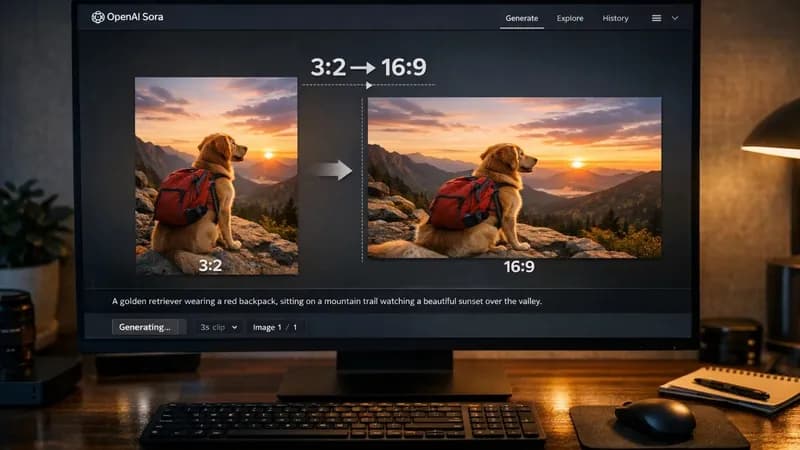
If you’ve been using ChatGPT to generate images, you’ve probably noticed one small but annoying issue — the aspect ratio doesn’t always match where you actually want to use the image.
Usually, the output comes in something like 3:2. It looks great on its own, but the moment you try to use it for a YouTube thumbnail, blog header, or banner… things start to break. You either crop it manually or just accept a weird layout.
I got tired of doing that over and over again.
So instead of fixing images manually, I set up a small flow that handles it automatically.
The Simple Idea
Whenever ChatGPT generates an image, I grab it and convert it into 16:9 right away.
No editing tools. No dragging corners. No second step.
It keeps the width exactly the same and adjusts the height in a way that feels natural, so the image doesn’t look stretched or awkward. Everything stays centred, which means the main subject is still where it should be.
Why This Actually Helps
It sounds like a small thing, but it changes how you work.
Before:
- Generate image
- Download it
- Open editor
- Adjust ratio
- Save again
Now:
- Generate image
- One click
- Done
That’s it.
Where It Becomes Powerful
The real benefit shows up when you’re not just making one image.
If you're generating multiple images from ChatGPT — for blog posts, content ideas, or even thumbnails — the experience turns into a smooth process instead of a repetitive task.
You can go through images one by one, convert them instantly, and save them directly where you want. No interruptions, no switching tools.
It Feels Like a Workflow, Not a Tool
What I like most is that it doesn’t feel like “editing” anymore.
It feels more like this:
- Generate
- Process
- Store
Everything just flows.
And when you’re doing this daily, even saving a few seconds per image adds up quickly.
Final Thought
ChatGPT is already great at generating images.
But getting them ready for real use — that’s where most of the friction is.
Once you remove that step and let it happen automatically, the whole experience becomes much smoother.
// ==UserScript==
// @name         Sora Task Dashboard
// @namespace    http://tampermonkey.net/
// @version      1.0
// @description  Connects to local API to fetch and process tasks
// @author       You
// @match        https://sora.chatgpt.com/*
// @grant        GM_xmlhttpRequest
// @grant        GM_addStyle
// ==/UserScript==

(function() {
    'use strict';

    // --- Configuration ---
    const API_BASE = "http://localhost:8000";
    let currentSavePath = `/home/ali/Downloads/default.png`;
    let imageRatio= '1:1'
    let currentTasks = [];
    let currentTaskIndex = 0;
    // --- Conver Image 3:2 -> 16:9
    async function convertTo169(base64Str) {
    return new Promise((resolve) => {
        const img = new Image();
        img.onload = () => {
            const canvas = document.createElement('canvas');
            const ctx = canvas.getContext('2d');

            // 1. Set 16:9 dimensions based on original width
            canvas.width = img.width;
            canvas.height = (img.width * 9) / 16;

            // 2. Calculate cropping (centering the 3:2 image vertically)
            // We draw the full width and let the height overflow/crop
            const drawHeight = img.height;
            const drawWidth = img.width;
            const offsetY = (canvas.height - img.height) / 2;

            // 3. Draw to canvas
            ctx.drawImage(img, 0, offsetY, drawWidth, drawHeight);

            // 4. Export new Base64
            resolve(canvas.toDataURL('image/jpeg', 0.9)); // 0.9 is quality
        };
        img.src = base64Str;
    });
}
    // --- Logic ---
async function pushImageToBackend(savePath) {
    const imgEl = document.querySelectorAll('img[alt="Generated image"]')[0];
    if (!imgEl || !imgEl.src) {
        alert("Image not found!");
        return;
    }

    const src = imgEl.src;
    let base64Data = "";

    uiStatus.innerText = "Processing image...";

    try {
        if (src.startsWith('data:')) {
            // Case A: It's already Base64
            base64Data = src;
        } else {
            // Case B: It's a link (http/https/blob)
            const response = await fetch(src);
            const blob = await response.blob();
            base64Data = await new Promise((resolve) => {
                const reader = new FileReader();
                reader.onloadend = () => resolve(reader.result);
                reader.readAsDataURL(blob);
            });
        }

        // --- THE FIX: Convert here so it catches both Case A and Case B ---
        uiStatus.innerText = "Resizing to 16:9...";
        base64Data = await convertTo169(base64Data);

    } catch (err) {
        console.error("Processing failed:", err);
        uiStatus.innerText = "Error ❌";
        return;
    }

    // Send the converted Base64 to FastAPI
    GM_xmlhttpRequest({
        method: "POST",
        url: `${API_BASE}/tasks/upload-image`,
        headers: { "Content-Type": "application/json" },
        data: JSON.stringify({
            image_base64: base64Data,
            path: savePath
        }),
        onload: function(response) {
            const res = JSON.parse(response.responseText);
            uiStatus.innerText = res.status === "success" ? "Saved ✅" : "Error ❌";
        }
    });
}
 async function waitForXPath(xpath, timeout = 5000) {
  return new Promise((resolve, reject) => {
    const getElement = () => {
      return document.evaluate(
        xpath,
        document,
        null,
        XPathResult.FIRST_ORDERED_NODE_TYPE,
        null
      ).singleNodeValue;
    };

    // 1. Check if it's already there
    const initialElement = getElement();
    if (initialElement) return resolve(initialElement);

    // 2. Start observing the DOM for changes
    const observer = new MutationObserver(() => {
      const element = getElement();
      if (element) {
        observer.disconnect();
        clearTimeout(timer);
        resolve(element);
      }
    });

    observer.observe(document.documentElement, {
      childList: true,
      subtree: true
    });

    // 3. Setup timeout
    const timer = setTimeout(() => {
      observer.disconnect();
      reject(new Error(`Timeout: XPath "${xpath}" not found within ${timeout}ms`));
    }, timeout);
  });
}
async function runGrokProcess(promptText = "A futuristic city with neon lights",imageRatio="1:1") {
    const timeout = 5000; // 5 second default timeout

    // Helper to find and wait for elements
    const getEl = (selector) => {
        return new Promise((resolve, reject) => {
            const start = Date.now();
            const interval = setInterval(() => {
                const el = document.querySelector(selector);
                if (el) {
                    clearInterval(interval);
                    resolve(el);
                } else if (Date.now() - start > timeout) {
                    clearInterval(interval);
                    reject(`Timeout: Selector "${selector}" not found.`);
                }
            }, 100);
        });
    };

    const sleep = (ms) => new Promise(res => setTimeout(res, ms));

    try {
        console.log("Starting Grok Image Process...");

         // 2. Click Model Select Trigger

        /*const modelBtn = await waitForXPath('(//div[contains(@class,"flex gap-1")]/button)[2]');

        modelBtn.focus();

        modelBtn.dispatchEvent(new KeyboardEvent('keydown', {'key': 'Enter', 'bubbles': true}));

        modelBtn.dispatchEvent(new KeyboardEvent('keyup', {'key': 'Enter', 'bubbles': true}));

        */

        //const target =await waitForXPath(`//div[@role="option"]/div//div/span[text()="3:2"]`)

        // 3. Click 1:1 Aspect Ratio

        //const ratioBtn = await getEl(`button[aria-label="${imageRatio}"]`);

        //target.click()


        // 4. Type Text into Input

        const inputDiv = await getEl('textarea');

        inputDiv.focus();

        // For contentEditable divs, we use textContent or execCommand

        document.execCommand('insertText', false, promptText);


        // 5. Delay 3 seconds

        console.log("Waiting 3 seconds...");

        //await sleep(3000);


        // 6. Click Submit


        //submitBtn.click();


        console.log("Process complete!");

        return true;


    } catch (error) {

        console.error("Grok Process Failed:", error);

        return false;

    }

}


// To trigger:

// runGrokProcess("Your custom prompt here");

    // --- UI Styles ---

    GM_addStyle(`

        #tm-dashboard {

            position: fixed;

            top: 20px;

            right: 20px;

            width: 300px;

            background: #222;

            color: #fff;

            padding: 15px;

            border-radius: 8px;

            z-index: 99999;

            box-shadow: 0 4px 10px rgba(0,0,0,0.5);

            font-family: monospace;

            font-size: 13px;

        }

        #tm-dashboard h3 { margin: 0 0 10px 0; color: #00ff00; }

        .tm-status { font-size: 10px; color: #aaa; margin-bottom: 10px; }

        .tm-data-box {

            background: #333;

            padding: 5px;

            margin-bottom: 10px;

            border: 1px solid #444;

            white-space: pre-wrap;

            max-height: 100px;

            overflow-y: auto;

        }

        .tm-btn-group { display: flex; gap: 5px; flex-wrap: wrap; }

        .tm-btn {

            flex: 1;

            padding: 8px;

            border: none;

            cursor: pointer;

            font-weight: bold;

            color: white;

        }

        .btn-refresh { background: #007bff; }

        .btn-process { background: #e67e22; }

        .btn-mark { background: #28a745; }

        .btn-skip { background: #dc3545; }

        .tm-btn:hover { opacity: 0.8; }

        .tm-btn:disabled { background: #555; cursor: not-allowed; }

    `);


    // --- HTML Structure ---

    const dashboardHTML = `

        <div id="tm-dashboard">

            <h3>Task Controller</h3>

            <div id="tm-api-status" class="tm-status">Checking API...</div>

            <div id="tm-task-info" class="tm-data-box">No tasks loaded.</div>


            <div class="tm-btn-group">

                <button id="btn-refresh" class="tm-btn btn-refresh">Refresh</button>

                <button id="btn-process" class="tm-btn btn-process" disabled>Process</button>

            </div>

            <div class="tm-btn-group" style="margin-top:5px;">

                <button id="btn-mark" class="tm-btn btn-mark" disabled>Mark Done</button>

                <button id="btn-skip" class="tm-btn btn-skip" disabled>Skip</button>

            </div>

            <div class="tm-btn-group" style="margin-top:5px;">

                <button id="btn-push-img" class="tm-btn" style="background: #9b59b6; margin-top:5px;">Push Image</button>

            </div>


        </div>

    `;


    // Inject UI

    document.body.insertAdjacentHTML('beforeend', dashboardHTML);


    // --- Elements ---

    const uiStatus = document.getElementById('tm-api-status');

    const uiInfo = document.getElementById('tm-task-info');

    const btnRefresh = document.getElementById('btn-refresh');

    const btnProcess = document.getElementById('btn-process');

    const btnMark = document.getElementById('btn-mark');

    const btnSkip = document.getElementById('btn-skip');

    const btnPushImg = document.getElementById('btn-push-img');


    // --- API Interactions ---


    function checkHealth() {

        GM_xmlhttpRequest({

            method: "GET",

            url: `${API_BASE}/health`,

            onload: function(response) {

                if (response.status === 200) {

                    uiStatus.innerText = "API: Online ✅";

                    uiStatus.style.color = "#00ff00";

                    fetchTasks(); // Auto fetch on healthy load

                } else {

                    uiStatus.innerText = "API: Error ❌";

                }

            },

            onerror: function() {

                uiStatus.innerText = "API: Offline ❌ (Check localhost:8000)";

            }

        });

    }


    function fetchTasks() {

        uiInfo.innerText = "Loading tasks...";

        GM_xmlhttpRequest({

            method: "GET",

            url: `${API_BASE}/tasks?action_type=grok_imagine`,

            onload: function(response) {

                const data = JSON.parse(response.responseText);

                currentTasks = data;

                currentTaskIndex = 0;

                renderCurrentTask();

            }

        });

    }


    function markTask(status) {

        if (!currentTasks[currentTaskIndex]) return;

        const task = currentTasks[currentTaskIndex];

        const endpoint = status === 'completed' ? 'mark' : 'skip';


        uiInfo.innerText = `Marking as ${status}...`;


        GM_xmlhttpRequest({

            method: "POST",

            url: `${API_BASE}/tasks/${task.id}/${endpoint}`,

            onload: function(response) {

                if(response.status === 200) {

                    // Remove current task from local list

                    currentTasks.splice(currentTaskIndex, 1);

                    // Render next one

                    renderCurrentTask();

                } else {

                    alert("Error updating task");

                }

            }

        });

    }


    // --- Logic & Rendering ---


    function renderCurrentTask() {

        if (currentTasks.length === 0) {

            uiInfo.innerText = "All tasks completed! 🎉";

            toggleButtons(false);

            return;

        }


        const task = currentTasks[currentTaskIndex];

        uiInfo.innerHTML = `<strong>ID:</strong> ${task.id.substring(0,8)}...<br>` +

                           `<strong>Type:</strong> ${task.data.action_type}<br>` +

                           `<strong>Meta:</strong> ${JSON.stringify(task.data.meta)}`;


        toggleButtons(true);

    }


    function toggleButtons(enable) {

        btnProcess.disabled = !enable;

        btnMark.disabled = !enable;

        btnSkip.disabled = !enable;

    }


    // --- Define Your Process Logic Here ---

    async function processCurrentTask() {

        if (!currentTasks[currentTaskIndex]) return;

        const task = currentTasks[currentTaskIndex];


        // ------------------------------------------

        // YOUR CUSTOM LOGIC GOES HERE

        // ------------------------------------------

        console.log("Processing task:", task);

        const data=task.data.meta

        currentSavePath = data.path

        //alert(`Processing logic for: ${task.data.action_type}\nData: ${JSON.stringify(task.data.meta)}`);

        await runGrokProcess(data.prompt,data.imageRatio)

        // Example: If task has a URL, maybe redirect there?

        // if(task.data.url) window.location.href = task.data.url;

    }


    // --- Event Listeners ---


    btnRefresh.addEventListener('click', fetchTasks);


    btnProcess.addEventListener('click',async () => {

    btnProcess.disabled = true; // Disable to prevent double-clicks

    btnProcess.innerText = "Processing...";


    try {

        await processCurrentTask(); // Now it actually waits!

        btnProcess.innerText = "Done!";

    } catch (err) {

        console.error("Process failed", err);

        btnProcess.innerText = "Failed";

    } finally {

        btnProcess.disabled = false;

    }

});


    btnMark.addEventListener('click', () => markTask('completed'));


    btnSkip.addEventListener('click', () => markTask('skipped'));

    // --- Elements ---


// Use an arrow function to pass the argument

btnPushImg.addEventListener('click', () => {

    pushImageToBackend(currentSavePath);

});

btnPushImg.addEventListener('keydown', function(e) {

        // Change 'b' and 'ctrlKey' to your preferred shortcut

        // Example: Ctrl + B

        if (e.key.toLowerCase() === 's') {


            // 1. Find the button using a stable selector

            const targetButton = document.querySelector('button[role="combobox"]');


            if (targetButton) {

                console.log('Shortcut triggered: Clicking button...');

                targetButton.click();

            } else {

                console.warn('Target button not found!');

            }


            // Optional: Prevent the default browser behavior for this shortcut

            e.preventDefault();

        }

    });

    // --- Init ---

    checkHealth();


})();