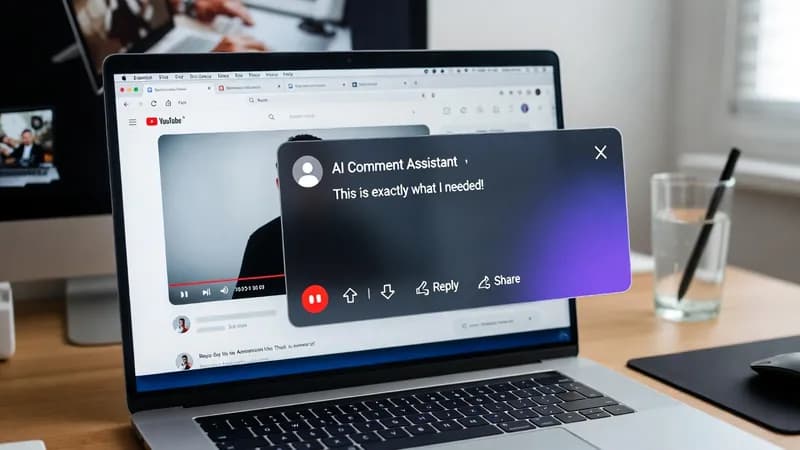
If you spend time on YouTube for marketing, outreach, or audience engagement, writing comments by hand slows everything down. I built a Tampermonkey userscript that takes over the repetitive part. This is a walkthrough of how that YouTube comment automation works, what it reads off the page, where it breaks, and when a free script stops being the right answer.
What this YouTube comment automation script does
The script reads three things directly from the video page you already have open — the video title, the expanded description, and a sample of the existing viewer comments. It packages those up and sends them to OpenRouter, which returns a comment written for that specific video.
That context is the whole point. A generator that only sees a video title produces something that could sit under any video on the platform, and it reads that way. Handing the model the description and a handful of real comments gives it enough to work with that the output sounds like someone who actually watched the video.
The three pieces of page data it reads
The title is the cheapest signal and the weakest one alone. It tells the model the topic and nothing about the angle, the tone, or who the video is for.
The expanded description is the piece most scrapers miss. YouTube collapses descriptions by default, so anything that grabs the description element without expanding it first gets two lines and a truncation marker. Expanding it is what surfaces the timestamps, the links, and the framing the creator actually wrote.
Sample viewer comments set the register. If the existing comments are one-line reactions, a four-sentence analytical comment reads as an outsider who wandered in. If the thread is detailed and technical, a one-liner disappears into it. Reading the room is something a model can only do if you show it the room.
The floating panel
The interface sits on top of the YouTube page as a small draggable panel. From it you can generate a comment, copy it, regenerate if the first attempt misses, or auto-fill it straight into YouTube's comment box. No second tab, no separate application, no copying between windows.
The panel persists as you move between videos — it stays where you dragged it — and it holds the settings for model selection and custom prompts, so you can shape the output once rather than re-instructing the model every time.
Setting up the Tampermonkey userscript
Two terms first, since they do a lot of work in this article. Tampermonkey is a browser extension that runs small JavaScript programs on pages you visit. A userscript is one of those programs. Together they let you add behaviour to a website you don't own, entirely inside your own browser. Nothing installs on a server, and nothing runs when your browser is closed.
The eight setup steps
- Install the Tampermonkey extension
- Create a new userscript
- Paste the script in and save it
- Open Settings in the floating panel
- Add your OpenRouter API key
- Choose your preferred AI model
- Open a YouTube video
- Generate comments in real time
That's browser automation with no extra software beyond the extension itself.
Getting an OpenRouter API key
OpenRouter is a service that gives you one API endpoint that routes to many different AI models, so you can switch between them without rewriting anything. An API key is a long secret string that identifies your account when the script makes a request — treat it like a password. You paste it into the panel's settings once, and it stays in your browser.
Costs are billed per token by whichever model you select, and they vary widely between models. Check the current rates yourself before you run a batch of anything, because a cheap model and an expensive one can differ by more than an order of magnitude for identical work.
Where browser automation like this breaks
A userscript reads a page by targeting specific elements in its HTML. When YouTube changes that HTML — which happens without notice and without a changelog — the targeting stops matching and the script fails. Usually it fails quietly: the panel opens, you hit generate, and the model returns something bland because the description and comment fields came back empty rather than throwing an error.
The comment box itself is the other common snag. It isn't a standard text input. It's a contenteditable element, which is a div that the browser treats as editable, and writing into one takes a different approach from setting the value of a normal form field. Anything that assumes a plain input will appear to succeed and post nothing.
Rate limits are the third. Both YouTube and your chosen model provider will throttle you if you move fast enough, and the failure modes differ — one returns an error you can catch, the other may just start ignoring you.
None of this makes the approach unworkable. It makes it something that needs maintenance, which is worth knowing before you build a workflow on top of it.
Terms of service are your call
I'll describe the technical approach; I won't tell you it's permitted. Automated posting sits in an area that YouTube's Terms of Service address directly, and platforms enforce their own rules on their own schedule. Read the terms, check what the platform says about automated activity, and decide for yourself whether your use fits. That decision is yours, not mine, and it isn't one I can make on a client's behalf either.
For what it's worth, the version of this that causes nobody any trouble is the one where the script drafts and a human reads before posting. The generation is the slow part. The clicking never was.
When a custom build makes more sense
A free script is a good answer to a small problem. It stops being the right answer at a few specific points.
When the workflow needs to run across many accounts, on a schedule, or from a machine that isn't your open laptop, a userscript can't do it — it only runs while your browser is open on the page. That's a job for a Playwright bot or a scheduled pipeline rather than an extension.
When the output needs to land somewhere other than the comment box — a Google Sheet for approval, a Postgres table, an Airtable base your team reviews — you need a data layer the script doesn't have.
When YouTube changes its markup and the thing breaks, somebody has to fix it. If that somebody isn't you, it needs to be a maintenance arrangement rather than a one-off download.
This particular script suits creators, marketers, and researchers doing engagement work at a manual pace. Past that pace, it's a different build. If that's where you are, you can hire me to build a custom version — I take these on through Fiverr, and the scope conversation happens before any code does. You can also look at the browser automation work I take on more broadly, read other build write-ups on my blog, or see how I work and what I build.
The script is a small demonstration of a larger pattern: pull structured data off a page you're already looking at, hand it to a model with enough context to be useful, and put the result back where you need it. Most of what I build is some version of that sentence.