Quick summary
>
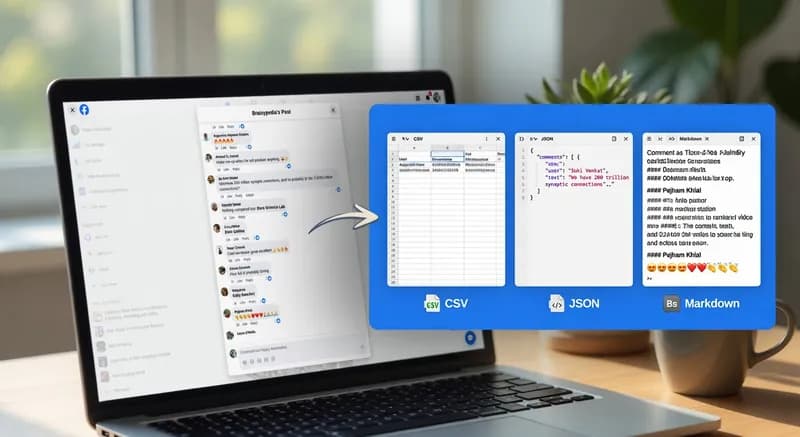
- A free Facebook comments scraper that runs in your browser
- Exports post comments to CSV, JSON, Markdown, or your clipboard
- No API key, developer account, or coding needed
- Setup takes about five minutes
Copying Facebook comments by hand is slow work.
Fifty comments means fifty selections, fifty pastes, and a messy spreadsheet to clean up afterward. If you need comments data for research, lead generation, or audience analysis, the manual route stops being practical after a post or two.
So I built a free Facebook comments scraper that runs right in your browser. It reads the comments on a Facebook post and turns them into clean, structured data you can download in one click.
Table of Contents
- Why scrape Facebook comments?
- Who this tool is for
- Comparing your options
- What data you get
- How to install the script
- How to scrape Facebook comments step by step
- How to clean your export
- What to do with your comments data
- Limitations
- Responsible scraping
- When you need more than a browser script
- FAQ
Why Scrape Facebook Comments?
The comment section is often more valuable than the post itself.
A post shows what a brand wants to say. The comments show what people actually think. That makes post comments one of the most honest sources of audience feedback you can find.
People commonly use comments data for:
- Audience research: learning the exact words customers use to describe their problems
- Competitor analysis: seeing what people praise or complain about on a competitor's page
- Content ideas: spotting questions that come up again and again
- Campaign feedback: measuring how people reacted to a launch, ad, or announcement
- Lead generation: finding people who openly asked for a product or service like yours
The hard part is getting that data out of Facebook in a usable format. That's exactly what this tool does.
Who This Facebook Comments Scraper Is For
This tool is for anyone who needs to scrape Facebook comments from one post at a time, without building a data pipeline.
Who | What they use it for |
Market researchers | Studying reactions to a product, campaign, or competitor |
Social media managers | Tracking feedback on their own posts |
Content creators | Finding recurring questions and topic ideas |
Analysts and students | Building a dataset from a public post |
Small business owners | Collecting feedback without a paid listening tool |
If your goal is "get these comments into a spreadsheet," this is the tool for you.
Comparing Your Options
There are four main ways to get comments out of Facebook.
Method | Setup | Cost | Best for |
Copy and paste | None | Free | A few comments |
Facebook Graph API | High | Free | Pages you manage |
This userscript | About 5 minutes | Free | One post at a time |
Custom scraper | Built for you | Paid | Many posts, on a schedule |
What this means for you:
- Copying by hand is fine for ten comments, not hundreds.
- The official API is powerful, but reading comments on pages you don't manage is restricted and needs Meta's app review. For one post, that's far too much setup.
- A browser-based comments scraper is the middle ground: free, fast to set up, and good enough for most one-off jobs.
What Data You Get
The scraper turns each comment into one row of data:
Field | What it contains |
Commenter name | The account's display name |
Comment text | The full comment, not a preview |
Reaction count | Reactions on that specific comment |
Profile link | The commenter's profile URL |
Timestamp | When the comment was posted |
Reply depth | How deeply the comment is nested in the thread |
Why reply depth matters
In a flat spreadsheet, a top-level comment and a reply look exactly the same. The conversation structure disappears.
Reply depth solves this. It shows who was answering whom, so you can separate original opinions from back-and-forth replies.
It's a small field, but it's what turns a pile of text into structured data you can actually analyze.
Nothing to set up per post
The script adds a small floating toolbar to the page. It recognizes Facebook post URLs and page URLs automatically.
Your workflow is always the same: scan, pick a format, download.
How to Install the Script
What is a userscript?
A userscript is a small piece of JavaScript that runs inside your own browser, on pages you choose.
It is not an app, a server, or a Facebook integration. It only runs while you have the page open, logged in as yourself. It sees exactly what you see, nothing more.
To run a userscript, you need a manager extension. This script is built for Tampermonkey, the userscript manager for Chrome, Firefox, and Edge.
Installation steps
- Install Tampermonkey from your browser's extension store.
- Open the Tampermonkey dashboard and click to add a new script.
- Delete the placeholder code Tampermonkey adds by default.
- Paste in the Facebook Comment Exporter script and save.
- Open any Facebook post. The toolbar appears in the corner of the page.
Toolbar not showing?
Try these fixes in order:
- Switch to desktop Facebook. Mobile and desktop Facebook use different web addresses, and the script is set up for desktop.
- Refresh the page after opening the post.
- Check Tampermonkey to make sure the script is switched on.
How to Scrape Facebook Comments Step by Step
Step 1: Open the post
Go to the post you want to scrape. This can be a public post, a page post, or a post in a group you belong to.
Step 2: Change the sort order
Facebook often sorts comments by "Most relevant," which can hide some comments completely.
Switch the sort to "All comments" so nothing is left out.
Step 3: Load every comment
This is the step most people miss.
Facebook only shows a few comments at first. The rest hide behind "View more comments" and "X replies" links. The scraper can only export comments that are visible on the page.
To load everything:
- Keep clicking "View more comments" until the link disappears.
- Open the reply threads you want to include.
- Scroll through once to make sure nothing is still loading.
Export looks too small? If a post has 400 comments and your file has 12 rows, the scraper isn't broken. Only 12 comments were loaded. Expand everything and scan again.
Step 4: Run the scan
Click the scan button on the toolbar. The script collects every loaded comment.
Step 5: Choose your format
Format | Best for |
CSV | Excel, Google Sheets, Airtable |
JSON | Code, databases, data pipelines |
Markdown | Reports, briefs, Notion docs |
Clipboard | Quick pasting, no file needed |
A few notes on the formats:
- CSV follows RFC 4180, the standard for comma-separated values. Commas and line breaks inside comments won't break your columns.
- JSON keeps the comment nesting intact. New to JSON? MDN's introduction to working with JSON explains the basics.
Not sure which to pick? Use CSV for spreadsheets and JSON for software.
How to Clean Your Export
A few quick fixes make your data much easier to work with.
Fix garbled emojis in Excel
Comments are full of emojis and non-English text. If you double-click a CSV file, Excel may show these as strange symbols.
The fix: In Excel, go to Data → From Text/CSV and choose UTF-8 as the file encoding. Google Sheets usually gets this right automatically.
Filter by reply depth
- Only want main opinions? Filter to the lowest reply depth value.
- Studying conversations? Keep all depths together, grouped by thread.
Remove duplicates
Scanning the same post twice can create repeated rows. Use your spreadsheet's "Remove duplicates" tool on the comment text and commenter name columns.
If you scrape the same posts regularly, a unique comment ID makes this much easier. It's available in a custom build (see the last section).
Sort by reactions
Sort by reaction count to see which comments resonated most with the audience.
What to Do With Your Comments Data
Once your data is clean, try these ideas:
- Find common questions. Search for "how," "where," "price," or "?" to see what people want to know.
- Measure sentiment. Tag each comment as positive, negative, or neutral, then count them.
- Study top comments. The most-reacted comments often reveal the audience's real opinion.
- Compare posts. Scrape several posts to see which topics sparked the most discussion.
- Build a keyword list. Reuse your customers' exact phrases in ads, landing pages, and content.
For market researchers, this is often the most valuable part. You get real customer language without running a single survey.
Limitations
Know where this tool stops before you rely on it.
Access depends on your account
The script sees what your logged-in browser sees:
- ✅ Public posts
- ✅ Private groups you belong to
- ❌ Groups you're not a member of
No browser script can get around this.
Facebook layout changes
The scraper finds comments by reading the page's structure. When Facebook changes its layout, the script may stop finding comments until it's updated.
This happens to every browser-based scraper. Expect occasional maintenance if you rely on it regularly.
One post at a time
This tool is built for one post at a time, with you at the keyboard. Scraping dozens of posts every week is a different job that needs different tools.
Responsible Scraping
Comments include names and profile links. In many countries, that counts as personal data.
Follow these simple habits:
- Collect only what you need. Delete the profile link column if you don't use it.
- Store data securely. Keep exports out of shared or public folders.
- Anonymize quotes. Leave out names when quoting comments in reports.
- Know the privacy rules. Laws like GDPR may apply if your data includes EU users.
Terms of service and robots.txt
I won't tell you whether scraping a particular site is legal. Here is how the tool works technically:
- It runs in your own browser.
- It only reads pages your account can already see.
- It makes no requests a normal browsing session wouldn't make.
Whether that fits within Facebook's terms of service, and what Facebook's robots.txt asks of automated tools, is your decision. If the data has commercial value, talk to a lawyer first.
When You Need More Than a Browser Script
A userscript is perfect for one post with you at the keyboard. It's the wrong tool when your work needs to:
- Run on a schedule
- Cover hundreds of Facebook post URLs
- Run unattended
- Send data straight into a database
For those jobs, I build:
- Python and Playwright bots that run a real browser without supervision
- Data pipelines that save to PostgreSQL, SQLite, Google Sheets, or Airtable
- Scheduled jobs triggered by REST or webhook calls
See my browser automation services for how these fit together, or browse more builds in the DatafetchPro article archive.
Frequently Asked Questions
Is this Facebook comments scraper free?
Yes. You add the script to Tampermonkey and run it in your browser at no cost.
Do I need an API key or developer account?
No. The script reads comments already visible on the page, so no API access is needed.
Can I scrape comments from any public post?
Yes, and more. It works on any post your account can view, including page posts and posts in private groups you've joined.
Why doesn't my export include every comment?
Facebook hides most comments until you expand them. Switch the sort to "All comments," expand every thread, then scan again.
Does it scrape replies?
Yes, as long as the replies are expanded on the page. Each reply is labeled with its reply depth.
Does it work on mobile?
No. The script is designed for desktop browsers.
Why did the scraper suddenly stop working?
Facebook most likely changed its page layout. The script needs an update when that happens.
Can it scrape multiple posts at once?
No. It handles one post at a time. For bulk or scheduled scraping, a custom scraper is the better choice.
Get a Custom Facebook Comments Scraper
Need something this script doesn't do? I can build a version around your exact workflow.
Popular requests include:
- Extra fields, like a unique comment ID to avoid duplicates across repeated scrapes
- Custom output that matches your database or report template
- A Chrome extension instead of a userscript
- Bulk scraping across a list of Facebook post URLs
- Nightly runs that collect comments automatically
Every project runs through Fiverr. Start with my custom scraper build service, or learn who I am and how I work first.