Why I stopped copying Google results by hand
If you have ever collected search results for a project, you know the loop. Search a keyword, scan the page, copy a title, copy the URL, copy the description, paste it into a spreadsheet, fix the formatting, then start again on the next result. By page two you are worn out, and you might still have hundreds of keywords ahead of you.
I got tired of that loop, so now I export Google search results to CSV with a small script that runs inside the browser instead. Nothing to code on your end, no subscription, no server to rent. This guide covers what the script does, how to install it, what the file looks like when it lands on your desktop, and the point where a free userscript stops being the right tool for the job.
What the Tampermonkey userscript does
Tampermonkey, explained in plain English
Tampermonkey is a free browser extension that runs small JavaScript files on pages you visit. Those files are called userscripts. Think of a userscript as a tiny program that sleeps until you land on a specific site, then wakes up and adds something to the page — in this case, a control panel on Google's results page with a start button and a page counter. You install the extension once from the official Tampermonkey extension site, then add scripts to it as you need them. It works on the major desktop browsers.
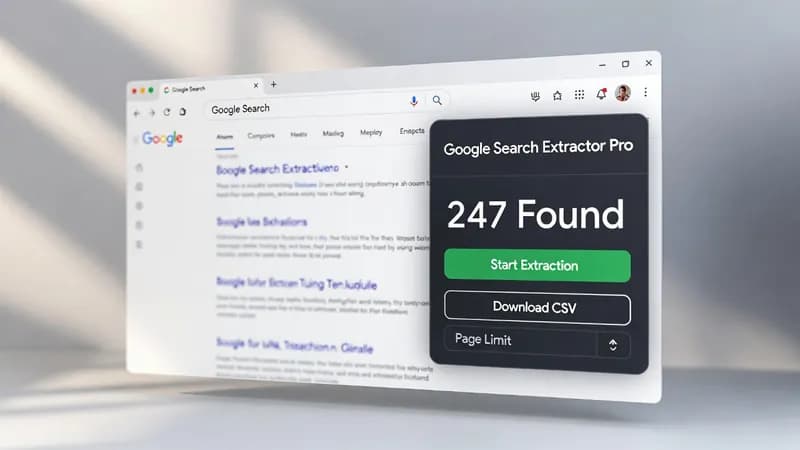
The script I use for this is called Google Search Extractor Pro. It collects titles, URLs, and descriptions across multiple result pages and hands you a CSV file at the end.
The four things the script handles
Four features do the real work, and one of them is the reason this approach holds up where simpler tools fall over.
Multi-page collection
You are not stuck with the ten results on page one. Set a target page count, press start, and the script works through each page in sequence, gathering every result as it goes. This is the difference between a sample and a usable dataset.
A live results counter
The panel shows the number of collected results climbing in real time. It sounds like a small thing. In practice it is how you know the run is still alive rather than quietly stalled on a page that never loaded.
A delay between page requests
The script waits between page requests instead of firing them off back to back. Most basic scraping tools skip this entirely, and it is usually why they fail. Spacing requests out at natural intervals makes the traffic pattern look closer to a person browsing, which lowers the odds of tripping Google's bot detection. I want to be straight with you: it lowers the odds, it does not remove them. You can still hit a CAPTCHA, and the section below covers what to do when you do.
One-click CSV download
When the run finishes, one click gives you the file. Open it in Excel, Google Sheets, Airtable, or whatever you already use. No reformatting step in between.
How to export Google search results to CSV, step by step
Installing the pieces
Two installs, once each, and you are done for good.
- Add the Tampermonkey extension to your browser from your browser's extension store.
- If you are on Chrome, turn on Developer mode in the extensions settings when prompted. Chrome asks for this before it will let an extension run user scripts, and the extension will tell you if the toggle is missing.
- Install the Google Search Extractor Pro script. Open the Tampermonkey dashboard, go to the Utilities tab, and paste the script into the "Import from" box — or open the
.user.jsfile directly and Tampermonkey will offer to install it for you. View the full Google Search Extractor Pro source Once installed it appears in the Tampermonkey dashboard as enabled. Reload any Google results page and the control panel shows up in the corner.
If the control panel does not appear on Google after this, the usual cause is that the script is installed but switched off. Open the dashboard and check the enabled column.
Running your first extraction
- Run a normal Google search for whatever you actually want.
- Set the number of pages you want the script to work through.
- Press Start Extraction and leave the tab alone while it runs.
- Download the CSV when the counter stops climbing.
I recommend a small first run — two or three pages on a query you know well. It takes a minute, and it tells you whether the columns contain what you expected before you commit to a forty-page run.
What lands in the CSV file
The columns you get
Each row is one search result, with the title, the URL, and the description snippet Google displayed. That is the file. It is a plain comma-separated text file, the format described in the RFC 4180 CSV specification, which is why every spreadsheet tool on earth opens it without complaint.
If accented characters or non-Latin scripts look scrambled when you open the file, that is your spreadsheet guessing the wrong text encoding on import, not damaged data. Import it again and pick UTF-8 explicitly.
Who actually uses this data
The people who ask me for SERP data export tend to fall into a few groups. SEO specialists pull results to see what is ranking for a target keyword, find content gaps, and build link prospecting lists. Digital marketers map the competitive field before a campaign launches and watch how results shift over time. Researchers and journalists gather sources quickly and keep dated snapshots of what a search returned. Business intelligence teams use it for market research and brand monitoring. Lead generation people run targeted queries to surface directories, business listings, and contact pages, then build outreach lists from the export.
Different jobs, same bottleneck: getting the data out of Google and into a spreadsheet without spending a day on it.
How this compares with extensions, Python, and paid SERP APIs
Other tools do a version of this, and each comes with a catch. Browser extensions frequently want an account, cap how many results you can export, or put the useful parts behind a paywall. Python scripts have no such limits, but somebody has to install Python, manage dependencies, and fix the script when it breaks — and if that somebody is not you, it is a hiring decision. Paid SERP APIs are genuinely good and genuinely expensive once you multiply the per-query cost by a real keyword list.
A userscript sits in the gap. It costs nothing, needs no account, and runs on the machine you already have. What you give up is scale and unattended operation, which is a fair trade until it isn't.
Show Image
When the script stops working, and what to check
Anything that reads a live web page will eventually break, because the page changes underneath it. Three failures account for most of what I see.
The counter stays at zero. Google adjusted its result markup and the script is looking for a container that no longer exists. This is normal maintenance for any scraper, not a sign you did something wrong. The fix is a selector update in the script.
A CAPTCHA appears mid-run. Stop, solve it, and start again with fewer pages per run and a longer gap between runs. If it keeps happening, you are asking for more volume than a browser session will comfortably give you, and that is a signal to move up to a proper pipeline.
The results look nothing like a colleague's. Google personalises results by location, language, and history. Two people running the same query get different pages. If you need neutral results, that is a real requirement worth designing around rather than a bug in the export.
Where a free userscript stops being enough
The script is a good answer to a specific question: I need these results in a spreadsheet, now, once. It stops being the right answer when the shape of the work changes.
Five hundred keywords is not a browser tab job. Neither is a weekly refresh you cannot be present for, or a run that has to deduplicate against last month's file, or data that needs to land in PostgreSQL or Google Sheets rather than a download folder, or an export that has to trigger something else the moment it finishes. At that point no-code web scraping in a browser tab is fighting the problem instead of solving it, and the job wants a scheduled Python and Playwright bot writing into a real database.
I build exactly that, and you can see the full range in <a href="/automation">the browser automation services I build</a>. There are also <a href="/blogs">other DatafetchPro scraping guides</a> covering adjacent problems.
Terms of service and robots.txt are your call
I am not going to tell you that scraping any particular site is legal, because that is not a claim I am in a position to make. What I can tell you is where to look. Read Google's Terms of Service and check Google's own robots.txt file, which states what the site asks automated clients not to touch. Whether your use fits inside those boundaries is your decision, and for anything commercial it is worth putting in front of someone qualified to advise you.
This applies to every scraping project I take on. I will describe what is technically possible and how I would build it. What you are permitted to collect stays with you.
Getting a custom scraper built
If the free script covers your need, take it and go — that is what it is for. If you read the section above about five hundred keywords and recognised your own situation, that is the kind of work I do: custom scrapers, browser automation, and data pipelines built to order, sold through Fiverr. You can start a custom scraper project with me, or read how I work and what I build first if you want a sense of the fit before you write to me.
Tell me the site, the fields you need, and how often you need them. I will tell you what it takes.