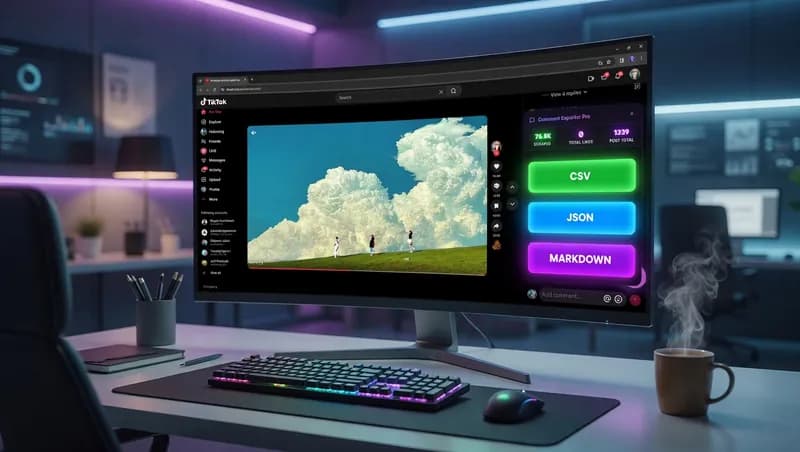
A TikTok video with real reach collects more comments than anyone wants to read by hand, and those comments carry audience insights, customer opinions, and trending discussions worth keeping. Getting them out is the hard part. The manual route is select, copy, paste, scroll, repeat — and TikTok loads more comments as you scroll, so the pile grows underneath you. I wrote a script that lets you export TikTok comments from a video into CSV, JSON, Markdown, or plain text in one pass, with no copying by hand.
This post covers what the script does, how to install it, where it stops being useful, and what I do when a client needs more than a browser script can give.
What happens when you export TikTok comments by hand
Manual collection is fine for one video and twenty comments. Past that it becomes unpaid data entry. You lose your place in the thread, you catch the same comment twice, and you have no reliable way to tell whether you got all of them.
Then there is the formatting problem, which most people do not see coming. Comments contain commas, quote marks, emoji, and line breaks. Paste a comment with a line break in it into a spreadsheet and one comment becomes four rows, silently, in the middle of a file you have already stopped checking. This is why real data extraction writes to a format specification instead of relying on the clipboard — the RFC 4180 CSV specification defines exactly how a field containing a comma or a newline has to be quoted and escaped.
The last cost is consistency. Collect from ten videos by hand over two weeks and you get ten slightly different spreadsheets, with different column orders and different ideas about what counts as a comment. A script produces the same shape every time, which is the whole point of automating social media data extraction rather than doing it in a browser tab.
What the TikTok comment exporter script does
The script runs inside your own browser on a TikTok video page. It reads the comments already on the page, counts them, and hands you a file. That is the entire job — it is a TikTok comment scraper, not a dashboard, and it does not sit between you and the site.
The floating control panel
Once the script is active, a small panel sits on top of the page while you browse. It stays out of the way and gives you four things:
- A live counter showing how many comments have been picked up so far
- A quick scan action that sweeps the comments currently loaded
- A preview so you can look at what was captured before you commit to a file
- Copy-to-clipboard, for when you just want the text in a message or a doc
Nothing downloads until you ask it to. If the count looks wrong, you scroll further and scan again.
The four export formats
Four buttons, four formats. Which one you want depends entirely on what happens to the data next.
CSV, for spreadsheets
CSV means "comma-separated values" — a plain text table that Excel, Google Sheets, and Airtable all open natively. Pick this if a human is going to read the comments, sort them, filter them, or hand them to a client. It is the right default for about eight out of ten requests I get.
JSON, for pipelines and APIs
JSON is a structured text format that programs read directly. An API — an interface one piece of software uses to talk to another — almost always speaks JSON. Pick this if the comments are feeding a script, a database, or a sentiment analysis tool rather than a person.
Markdown and plain text, for reports
Markdown is lightly formatted text that pastes cleanly into Notion, GitHub, or a client report without carrying junk styling with it. Plain text is the escape hatch when you want the words and nothing else.
Installing the Tampermonkey userscript
The exporter ships as a userscript, which is worth explaining before you install anything.
What a userscript is
A userscript is a small piece of JavaScript that runs on a specific website, in your browser, after the page loads. It is not an app, it does not run on a server, and it has no access to anything except the page you are looking at. When you close the tab, it stops. That is why a userscript is a reasonable thing to hand a non-technical client — the blast radius is one browser tab.
Userscripts need a manager to run them. Tampermonkey is the common one, it is free, and it works in Chrome, Edge, Firefox, and Safari. Install it from the official Tampermonkey site rather than a mirror.
Adding the script and running it
- Install Tampermonkey and pin it to your browser toolbar.
- Open the Tampermonkey dashboard and create a new script.
- Paste in the contents of
tiktok-comments-export-v1.js, then save. - Open any TikTok video page and refresh once. The floating panel should appear.
- Scroll the comments until the counter stops climbing, then export.
Step four is where most problems show up. If the panel does not appear, the usual causes are Tampermonkey being disabled for that site, or the script's match pattern not covering the exact TikTok URL you are on.
Where this script runs out
This is a browser script, and browser scripts have hard ceilings. Being straight about them saves everyone a support message.
It only sees what the page has loaded. TikTok loads comments as you scroll, so the export contains what you scrolled to and nothing more. If you want every comment on a video with tens of thousands of them, you are going to be scrolling for a while.
It breaks when TikTok changes its markup. The script finds comments by looking for specific elements in the page structure. When TikTok redesigns that structure, the script stops finding them and returns zero. This is normal for every browser-based scraper in existence and it is the main reason I do not recommend userscripts for anything a business depends on weekly.
It runs one video at a time, by hand, on your machine. There is no scheduling, no queue, no retry.
Terms of service and robots.txt are your call
I will not tell you that scraping any particular site is legal, because that is not my call to make and it depends on your jurisdiction, your purpose, and what you do with the data afterward.
What I will tell you is where to look. TikTok's published terms of service set out what the platform permits, and the robots.txt standard defined in RFC 9309 describes the convention sites use to signal what automated clients should leave alone. Read both, decide what you are comfortable with, and if the data is going anywhere near a commercial product, ask a lawyer rather than a developer.
When a browser script is the wrong tool
A userscript is the right answer when you need comments off a handful of videos, occasionally, and you are the one clicking. It is the wrong answer the moment any of these become true: you need this to run on a schedule, you need it across hundreds of URLs, you need it to survive a site redesign without you noticing, or you need the output landing in a database instead of your downloads folder.
That is the point where I build something properly. Depending on the job that means a Python and Playwright bot that drives a real browser on a server, a no-code UI.Vision macro your team can run without me, a Chrome extension, or a scheduled pipeline that writes straight into PostgreSQL, Google Sheets, or Airtable and tells you when it fails. You can see the full range on my browser automation and scraping services, and the rest of my write-ups on scrapers and userscripts are collected in the DatafetchPro article archive.
I work solo and I sell through Fiverr only, so the person who scopes your job is the person who writes the code and the person who fixes it at 11pm when the site changes. If you have a data problem and a URL, describe both when you hire me to build a custom scraper. If you would rather know who you are dealing with first, my background and how I work covers it.