You followed 1,400 accounts over four years and maybe eighty of them still matter. Instagram gives you no bulk control: tap Following, tap Unfollow, tap Unfollow again in the popup, scroll, repeat until your thumb gives out. This is a walkthrough of an Instagram bulk unfollow userscript I wrote — a small panel that sits on your own profile page, works down the list at human speed, and never touches accounts you put on a keep list. The script is free to copy and run. I'll also cover where it breaks, because it does.
What the Instagram bulk unfollow script actually does
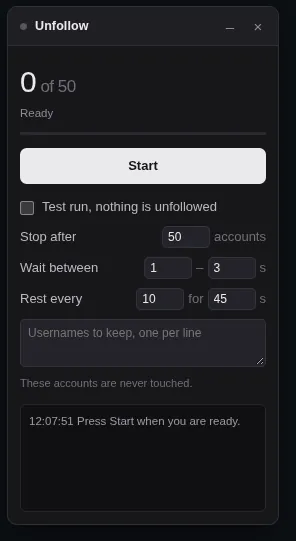
It opens your Following list, clicks Following and then Unfollow on each row, waits a randomized few seconds, and stops at a limit you set. Everything happens inside your own browser in your own logged-in session, so there is no server, no password to hand over, and no API key.
The panel loads as a small chip near the top of the page and expands when you click it. A "Clean up" button also appears beside the Following count in your profile header, so you can hide and show the panel without hunting for it.
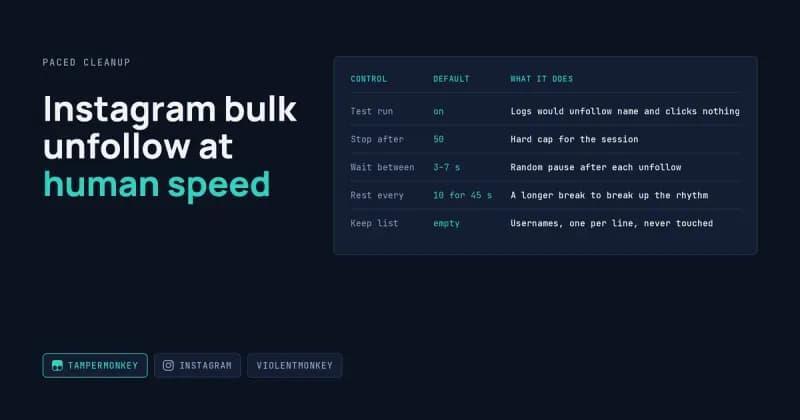
Control | Default | What it does |
|---|---|---|
Test run | on | Logs |
Stop after | 50 | Hard cap for the session |
Wait between | 3–7 s | Random pause after each unfollow |
Rest every | 10 for 45 s | A longer break to break up the rhythm |
Keep list | empty | Usernames, one per line, never touched |
Test run is switched on by default. Leave it on for the first pass, read the log, and only then turn it off.
Installing the Tampermonkey userscript
Install the extension, create a new script, paste the file, press Ctrl+S, reload Instagram. A userscript is just a piece of JavaScript your browser injects into a page after it loads; it has no special permissions, it only does what you would do with a mouse.
- Add the Tampermonkey browser extension for Chrome, Edge, Firefox or Safari.
- Open the Tampermonkey dashboard and click the + tab.
- Open this link and copy the text: Instagram Bulk Unfollow Script
- Delete the starter stub, paste the whole file, save with Ctrl+S.
- Go to
instagram.com/yourhandleand look for the chip.
If you prefer an open-source manager, the Violentmonkey userscript manager runs the same file without changes.
The header block at the top of the script is what tells the extension when and where to wake up:
// @match        https://www.instagram.com/*
// @grant        GM_setValue
// @grant        GM_getValue
// @run-at       document-idle
// @noframes
@run-at document-idle holds the script back until the page has settled, @noframes keeps it out of embedded iframes, and the two GM_ grants let your settings survive a reload. The full file is published on the Instagram unfollow userscript page in the DatafetchPro community.
The delays are the product, not the packaging
Unfollowing three hundred accounts in ninety seconds is the fastest route to a temporary action block. The pacing is the only part of this script that is doing real work; the clicking is trivial.
Three things space the run out. Each unfollow is followed by a random pause between your minimum and maximum, so the gaps never form a clean pattern. Every tenth account triggers a longer rest. And the session cap stops the run whether or not you are still watching.
I don't publish a "safe" number of unfollows per hour, because I have no way to verify one and neither does anyone else selling you a number. The defaults here are deliberately slow. Instagram's Terms of Use cover automated interaction, and whether you run this is your call, not mine.
Where it breaks
Every script that reads a page it doesn't own is one deployment away from being wrong. These are the four failures I've actually hit.
The selectors go stale
The script finds rows with XPath expressions like //button[./div/div[text()="Following"]]. When Instagram reshuffles its markup, that match returns nothing and the run ends immediately with No Following link on this page. The selectors are grouped in one SEL block at the top of the file so they can be repaired in a minute rather than an afternoon.
The same block is why a non-English interface fails. If your account language is Spanish, the button says "Siguiendo" and nothing matches. Switch Instagram to English for the run, or add your language's strings to SEL.followingBtn and SEL.confirmBtn.
"no confirmation appeared"
Clicking Following opens a confirmation dialog stacked above the list, and the script waits up to seven seconds for it. When that dialog stops appearing, you get no confirmation appeared for username in red. Three of those in a row and the run halts with Instagram stopped responding. Try again in a few hours. That streak counter exists so the script doesn't keep hammering a rate-limited account.
The list stops loading
The Following modal is a virtualised list: rows are created as you scroll and thrown away behind you. The script picks the tallest scrolling container inside the dialog and pushes it to the bottom when it runs out of rows. After five empty passes it reports Reached the end of your list, which is sometimes true and sometimes just a slow network. If the number looks short, close the modal and run it again.
You navigate mid-run
Instagram is a single-page app, so the URL changes without a page load. The script patches pushState and replaceState to notice that, stops the run, and remounts itself on the new page. Starting a run and then browsing elsewhere will end it, which is the behaviour I want over a script quietly clicking on a page you've left.
What it can't do
It cannot tell you who doesn't follow you back. That needs your follower list pulled and cross-referenced against your following list, which is a different job with a different output — a spreadsheet, not a button.
When a userscript is the wrong tool
A userscript is right when one person, on one machine, wants to do a manual task faster. It's the wrong shape once you need output, scheduling, or scale.
You need | Better fit |
|---|---|
A CSV or Google Sheet of every account you follow | A scraper with a real data layer |
The same cleanup across five client accounts | A Playwright script with separate browser profiles |
It to run weekly without you watching | A scheduled job on a server |
A friendlier install for a non-technical team | A packaged Chrome extension |
Those are all builds rather than scripts, and I cover the shapes they take on the DatafetchPro automation services overview.
Frequently Asked Questions
Will this get my Instagram account banned?
I can't promise it won't, and nobody honestly can. Automated interaction sits against Instagram's terms, and the realistic risk is a temporary action block rather than a ban. The slow defaults, the session cap and the rest intervals all exist to reduce that risk, not to remove it.
Does it work on the Instagram mobile app?
No. It runs in a desktop browser through a userscript manager, which the iOS and Android apps don't support. Safari on iOS can run Userscripts-style extensions, but the panel is built for a desktop-width layout and the profile header markup differs, so I wouldn't rely on it.
Can I unfollow only the accounts that don't follow me back?
Not with this script. The Following modal doesn't expose that relationship, so answering it means collecting both lists and comparing them. That's a scraping job that produces a file you review before anything gets clicked, and it's the version most people actually want.
Does the script need my password?
No. It runs inside the tab where you're already signed in and clicks the same buttons you would. Your settings and keep list are stored locally by Tampermonkey through GM_setValue. Nothing is sent anywhere, and you can read every line of the file before you paste it.
Why does it only appear on profile pages?
The script checks the URL path against a list of reserved Instagram routes like explore, reels and direct, and only mounts when the path looks like a profile. That keeps the panel out of your DMs and your feed, and it re-checks after every in-app navigation.
Free scripts are fine until the selectors change, your list is 8,000 long, or you need the result as a spreadsheet instead of a click. I build those: a Playwright bot, a packaged extension, or a Tampermonkey script hardened for your account. Tell me what you're cleaning up on the DatafetchPro project request page.