You found a Reel worth keeping. You want the full-quality file, and you don't want to paste links into a downloader site buried in pop-ups. Most people search for this as "instagram download video without mark hd", which really means three things: save the original video, with no watermark stamped on it, at the best resolution Instagram serves. This guide shows the route I'd pick myself. A free userscript called IG Helper, run through Tampermonkey, adds a download button directly on the Instagram post. I'll give you the exact script URL, the install steps, and the fixes for when it stops working.
Step 1:
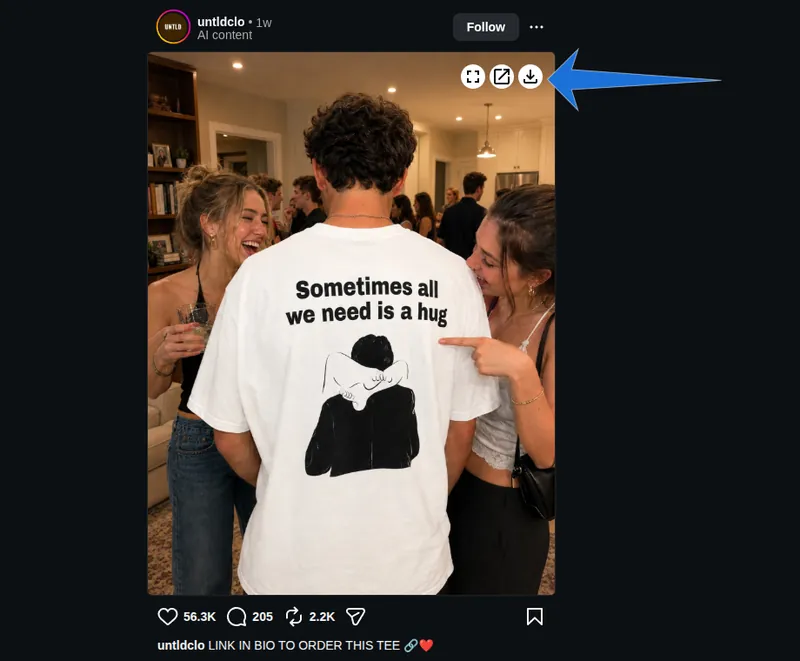
Step 2:
Select Resources
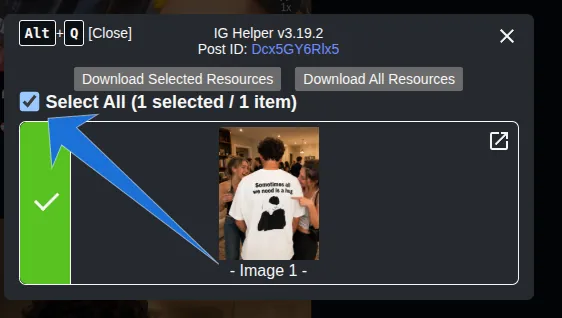
Step 3:
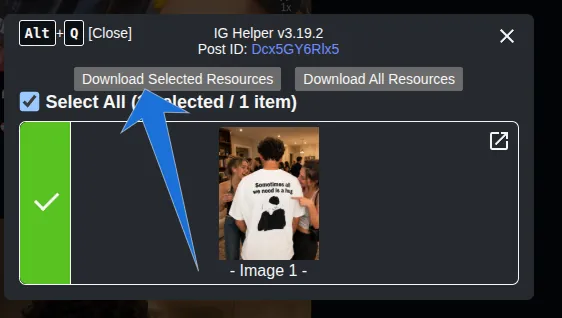
Finally, click on download
Instagram Download Video Without Mark HD: What It Means
You want the raw video file Instagram already sends to your browser, not a screen recording or a re-exported copy. The username overlay you see on some saved Reels comes from Instagram's in-app download option, which renders a new version; the file the web player loads doesn't carry it.
A userscript is a small piece of JavaScript that runs on one specific website, inside your own browser. It can add buttons, change a layout, or save files the site has already loaded. Tampermonkey is the browser extension that manages those scripts. It installs them, updates them, and only switches each one on for the sites it was written for. It's the same kind of tool I build for clients as part of my custom browser automation services.
"HD" needs an honest caveat. A script can only save the best version Instagram actually has. If the creator uploaded a 720p clip, you get 720p. IG Helper does have a Media API option that asks Instagram for its highest-quality variant, instead of whatever the player picked for your connection speed.
What You Need Before You Start
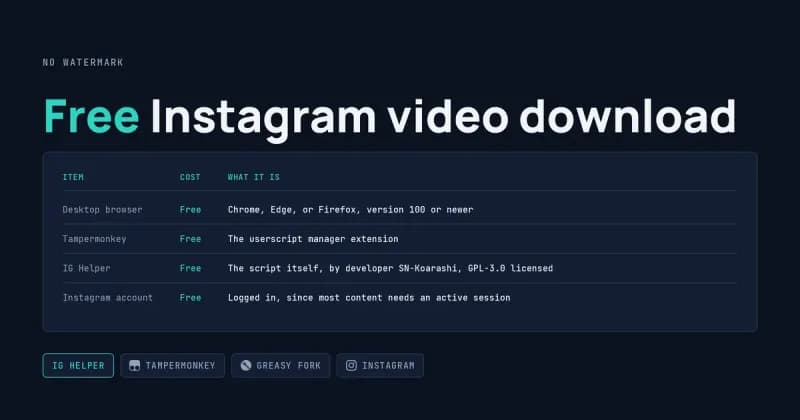
You need a desktop browser, one extension, and one script, all free. Here's the full list.
Item | What it is | Cost |
|---|---|---|
Desktop browser | Chrome, Edge, or Firefox, version 100 or newer | Free |
Tampermonkey | The userscript manager extension | Free |
IG Helper | The script itself, by developer SN-Koarashi, GPL-3.0 licensed | Free |
Instagram account | Logged in, since most content needs an active session | Free |
This is a desktop setup. Safari users can try Tampermonkey for Safari or the Userscripts app, which Greasy Fork lists as options, but I haven't covered that path here.
How to Find and Install the Tampermonkey Instagram Downloader
Install Tampermonkey first, then open the IG Helper listing on Greasy Fork and press the install button. The order matters, because Greasy Fork only offers a working install once a script manager is present.
Step 1: Install Tampermonkey
Get it from Tampermonkey's official download site, which sends you to the correct store for your browser. After installing, pin its icon to your toolbar so you can see when a script is running.
Step 2: Open the Exact Script URL
This is where most people get stuck. Searching Greasy Fork for "Instagram" returns hundreds of scripts, several with similar names. Skip the search and paste this address straight into your browser:
https://greasyfork.org/scripts/404535
It redirects to https://greasyfork.org/en/scripts/404535-ig-helper. Before installing, check three things: the title reads IG Helper, the author is SN-Koarashi, and the number in the address is 404535. If any of those differ, you're looking at a different script. You can also open IG Helper on Greasy Fork directly.
Step 3: Install and Confirm
Click Install this script. Tampermonkey opens a tab showing the code and the sites it applies to, and the only site listed should be instagram.com. Click Install on that tab, open Instagram, and check that the Tampermonkey icon shows a small counter.
Download Instagram Reels in HD Without Leaving the Post
Once the script is active, a download icon appears on posts, Reels, and Stories. Click it and the file goes straight to your Downloads folder, with no new tab and no third-party site.
The features that matter most for video:
- Download every item in a carousel post at once, or only the one on screen.
- Save the video thumbnail, if you need the cover frame.
- Turn on the browser's native video controls, so you can scrub through a clip.
- Turn off video looping.
- Set a custom filename format, so files don't land as long strings of numbers.
Change the Settings
With Instagram open, click the Tampermonkey icon and pick IG Helper's settings entry, or press Alt+W. This is where you switch on the Media API option for higher-quality files and set your filename format.
Keyboard Shortcuts
Shortcut | What it does |
|---|---|
Alt+Q | Close the pop-up window |
Alt+W | Open the settings menu |
Alt+Z | Open the debug menu |
Alt+S | Download the resource on a Story |
When It Goes Wrong: Common Failures and Fixes
Most failures come from three places: the browser blocking userscripts, Instagram changing its layout, or Instagram noticing traffic that looks automated. Here's how each one shows up.
The Script Is Installed but No Button Appears
Recent Chrome versions stop extensions from running userscripts until you allow it. Go to chrome://extensions, open Tampermonkey's Details, and turn on Allow User Scripts; older Chrome versions use the Developer mode switch in the top-right corner instead. Google explains the change in its Chrome userScripts API documentation. Reload Instagram afterwards.
The Button Vanished After an Instagram Update
Instagram changes its page structure often, and the script finds posts by looking for specific elements. The developer notes that layouts can differ from person to person, so it may not work for everyone. From the Tampermonkey menu, choose "Check for userscript updates". If that doesn't fix it, look through open reports in the IG Helper GitHub repository before filing a new one.
The Video Saved in Low Quality
The web player often loads a lighter version on a slow connection. Turn on the Media API option in settings and download again. If the file is still small, the original upload probably wasn't high resolution.
You Got Logged Out or Received a Warning
Take this one seriously. The developer warns that heavy use, especially with Media API or Force Fetch switched on, can trigger Instagram's bot checks and lead to logouts, warnings, or a ban. Space your downloads out, don't bulk-save entire profiles, and don't run it on an account you can't afford to lose.
Private Posts and Expired Stories
The script can only save what your logged-in browser can already see. Posts from private accounts you don't follow, and Stories older than 24 hours that aren't in Highlights, are out of reach.
Is This Allowed?
Technically, the script saves files your browser has already received. Whether you may download and reuse a particular video depends on Instagram's terms of service and the creator's rights, and that decision is yours. If you plan to repost a clip or use it commercially, ask the creator first. You can read more about how I handle data projects.
Frequently Asked Questions
Does IG Helper work on a phone?
Not in the normal Instagram app. Userscripts need a browser extension, and most mobile browsers don't support Tampermonkey. Greasy Fork lists Tampermonkey for Safari and the Userscripts app for Apple devices, but the script's developer builds and tests on desktop Chrome with Tampermonkey, so that's the setup most likely to work.
Is the IG Helper script safe to install?
Its code is public under the GPL-3.0 license, and you can read it on the Code tab of the Greasy Fork listing or on GitHub. Tampermonkey also shows which sites a script runs on before you confirm. That's more transparency than most downloader sites give you, but still read recent feedback before installing.
Why does Greasy Fork say I need a user script manager?
Greasy Fork hosts scripts but can't run them. When no manager is detected, the install button shows a notice asking you to add one, such as Tampermonkey or Violentmonkey. Install the extension, reload the Greasy Fork listing, and the install button will hand the script to your manager.
Can I download a whole Instagram profile at once?
IG Helper works one post at a time, and its developer warns that heavy use can trigger Instagram's automation checks. Bulk collection is a different job that needs rate limiting, error handling, and a clear decision about the platform's terms. The DatafetchPro blog on scraping and automation covers that kind of project.
Need a Custom Instagram Workflow?
If one video at a time isn't enough, I build userscripts and Tampermonkey tools to order: renaming files by creator, logging saved posts to Google Sheets, or fitting your team's exact routine. Send me the details through the custom userscript project brief.