
Turn YouTube Into a Comment Data Goldmine
If you’ve ever tried collecting YouTube comments manually, you already know how painful it is—opening videos one by one, scrolling endlessly, copying text… it just doesn’t scale.
This script fixes that.
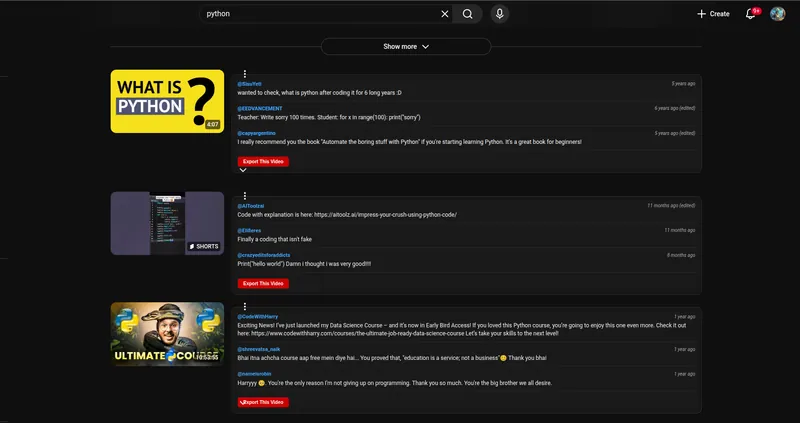
The YouTube Comments Previewer lets you see real comments directly inside the video grid—without even opening the video. On top of that, you can export everything to CSV with a single click.
What This Script Actually Does
Instead of forcing you to dig into each video, it quietly runs in the background and
- Pulls comments using YouTube’s internal API
- Displays a preview right next to each video
- Shows author name + comment + “time ago”
- Collects data across multiple videos automatically
- Lets you export everything as CSV
So while you scroll YouTube, you're basically building a dataset without extra effort.
Key Features
1. Inline Comment Preview
Each video card gets a mini sidebar showing real comments. No extra clicks needed.
2. “Time Ago” Support
You don’t just obtain comments—you get context like “2 days ago”, which is useful for trend analysis.
3. Bulk Data Collection
The script keeps collecting comments while you browse. You don’t lose anything unless you clear it.
4. One-Click CSV Export
- Export comments for a single video
- Or export everything you’ve collected so far
5. Lightweight Dashboard
A floating panel gives you:
- Export button
- Clear memory option
Why This Is Useful
This isn’t just a “nice UI tweak.” It’s a serious tool if you're into the following:
- Lead generation
- Sentiment analysis
- Competitor research
- Content idea validation
- Audience targeting
You can quickly spot:
- What people are asking
- What problems they mention
- What products they’re interested in
How It Works (Simple Explanation)
The script taps into YouTube’s internal API to fetch comment data without opening the video page.
Then it.
- Extracts comment details (author, content, time)
- Injects a preview UI into the video grid
- Stores everything locally in memory
- Converts data into CSV using PapaParse
All of this happens silently while you browse.
How to Use It
- Install Tampermonkey
- Add this script
- Open YouTube homepage or search results
- Scroll normally
You’ll start seeing comment previews automatically.
When you're ready:
- Click “Export Overall CSV” to download everything
- Or use “Export This Video” for specific data
Final Thoughts
If you're doing anything with data—especially scraping or automation—this app is one of those small tools that saves hours without feeling like a "tool".
It just blends into your workflow.
And that’s exactly what makes it so powerful.